
Written by: Segun Akomolafe
If you have been searching for the best open source firewalls to protect your home network, you are already ahead of the curve. Most homeowners trust only the basic firewall baked into their router, and that is barely enough to stop a determined attacker. Open source firewalls give you enterprise-grade security without the enterprise price tag, and many of them are surprisingly easy to set up, even if you are not a network engineer.
This guide breaks down five of the most reliable, actively maintained options available today. We will look at what makes each one stand out, who it is best suited for, and exactly what hardware you really need to get started.
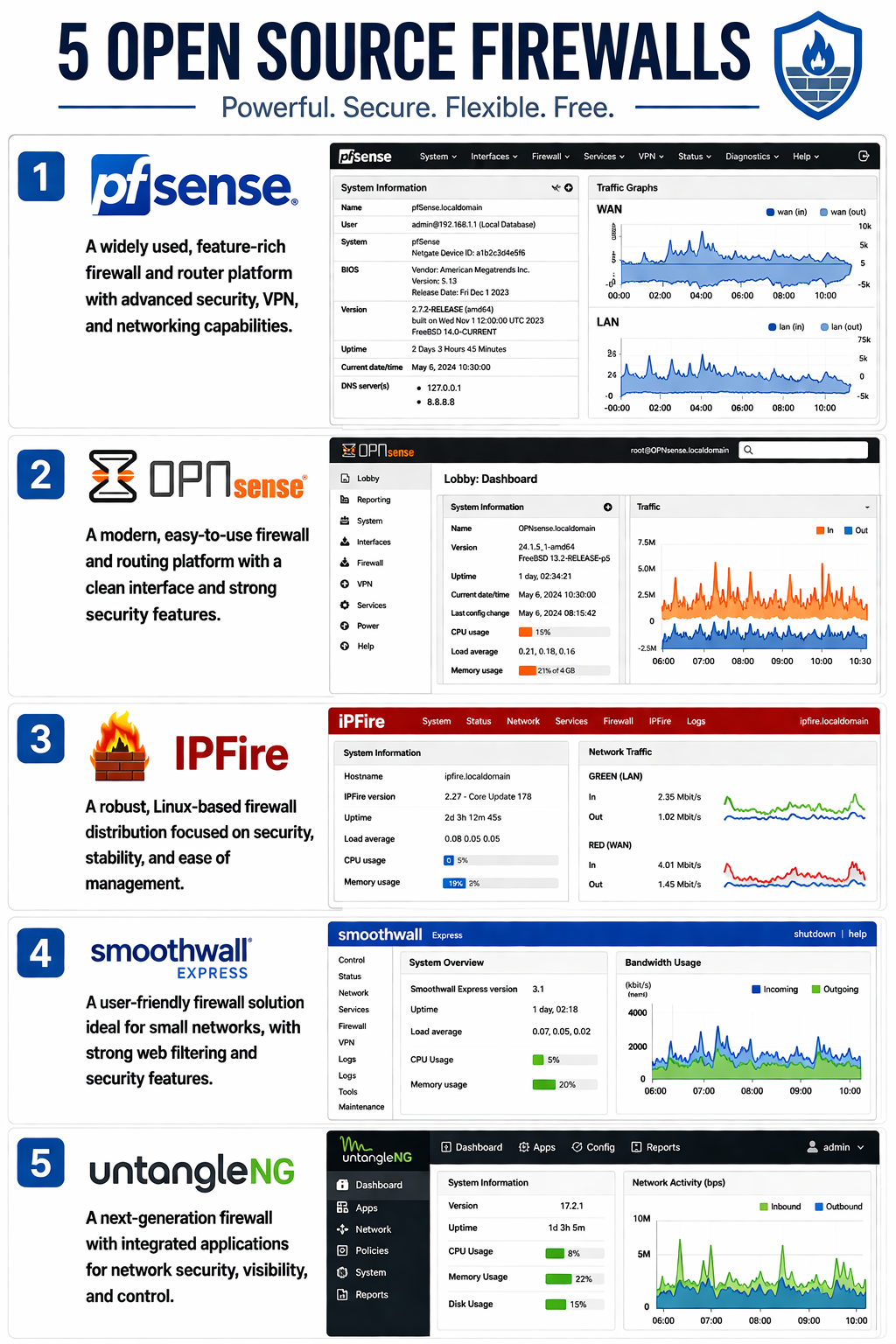
Quick Answer: Top Open Source Firewalls for Home Networks
pfSense is the top pick for open source firewalls at home because it gives you great security and has lots of easily accessible features. If you want quick updates and a sleek look, go for OPNsense. IPFire is perfect for older or low-end computers, while Smoothwall Express and Untangle NG are great for families that want content filtering included. All five of these options work on regular PC hardware and won’t cost you a lot.
Why Your Home Network Needs a Dedicated Firewall
Your router’s built-in firewall is designed for basic protection, it handles simple traffic filtering and NAT, but that is around where it stops. A dedicated open source firewall goes much further. It inspects packets deeply, blocks suspicious connections proactively and gives you full visibility into everything happening on your network.
Think about how many devices are connected in your home right now: smart TVs, phones, laptops, a thermostat, maybe a baby monitor. Each one is a potential entry point. Here is what a dedicated open source firewall adds to your home security setup:
- Deep packet inspection that catches threats your router misses
- Real-time traffic monitoring across every connected devices
- Intrusion detection system (IDS) that flag unusual activity automatically
- Content filtering and parental controls built right in
- VPN server support so you can securely access home devices remotely
- Custom firewall rules tailored to exactly how your household uses the internet
Read more: How to Protect your Home WiFi Network: An Updated Step-by-Step Security Guide
Top 5 Best Open Source Firewalls for Home Networks
The best open source firewalls listed here were selected based on real-world performance, active community support, ease of setup and long-term reliability. Take a look at the quick comparison table below before diving into each one.
|
Firewall |
Best For |
Skill Level |
Hardware Need |
Cost |
|---|---|---|---|---|
|
pfSense |
Power users & advanced setups |
Intermediate |
Moderate |
Free |
|
OPNsense |
Everyday home users |
Beginner–Intermediate |
Moderate |
Free |
|
IPFire |
Lightweight / older hardware |
Beginner |
Low |
Free |
|
Smoothwall Express |
Families & content filtering |
Beginner |
Low |
Free |
|
Untangle NG |
Feature-heavy home networks |
Intermediate |
Higher |
Free (basic) |
1. pfSense — The Gold Standard for Home Power Users
pfSense is arguably the most well-known name among the best open source firewalls available today. This powerful software ensures robust network security and advanced routing capabilities for modern home labs and enterprise environments. Built on FreeBSD, it delivers a full-featured web interface where you can manage everything from traffic shaping and VPN tunnels to DHCP and DNS. The plugin library is extensive. Snort for intrusion detection, Squid for web caching, and pfBlockerNG for ad and tracker blocking are just a few popular additions.
pfSense runs on almost any x86 hardware, and Netgate (the company behind it) also sells dedicated appliances if you want a plug-and-play setup. The community is large, so help is never more than a forum post away. The only real downside is the learning curve. It rewards users who are willing to spend a little time understanding what each setting does.
Read more: How to Secure Your Smart Home IoT Devices From Unauthorized Access: An Updated Guide
2. OPNsense — Clean, Modern, and Incredibly Well-Maintained
OPNsense started as a fork of pfSense and has developed into one of the most respected open source firewalls in the home networking space. What sets it apart is the polished, intuitive interface, the release cadence (updates drop every two weeks), and the fact that Suricata IDS comes built in, no extra plugins needed. Two-factor authentication is also baked in from day one.
If you value security patches arriving fast and a dashboard that does not feel like it was designed in 2008, OPNsense is the one to beat. It runs on the same hardware as pfSense, so you are not locked into any proprietary equipment. The FreeBSD-based open source platform offers you foolproof network security, making sure that your enterprise firewall remains optimally adapted to modern-day demands.
Read more: How to Setup a Home WiFi Network
3. IPFire — Lightweight, Simple, and Perfect for Older Hardware
IPFire is a Linux-based firewall distribution with a focus on simplicity and performance. One of its most practical design decisions is the color-coded zone system, Red (internet), Green (trusted LAN), Blue (wireless), and Orange (DMZ), which makes network segmentation visual and intuitive. Even if you have never set up a firewall before, IPFire’s interface guides you through the process logically.
It runs comfortably on hardware as old as a decade, making it an ideal choice if you have a spare PC lying around. Suricata powers its IDS, and a built-in web proxy handles caching and content filtering. IPFire also has an active add-on system called Pakfire that lets you install extra tools without much fuss.
4. Smoothwall Express — The Go-To Choice for Family Homes
Smoothwall Express has been around since the year 2000 and remains one of the most beginner-friendly options among the best open source firewalls. It strips away unnecessary complexity and hands you a clean web dashboard covering traffic filtering, bandwidth monitoring, and content controls. If you have children at home and need reliable content filtering alongside solid firewall protection, Smoothwall deserves a spot on your shortlist.
The hardware requirements are very modest — an old Mac or even a thin client can handle it. Setup is guided and straightforward, and the interface never overwhelms you with options you did not ask for. It is not the flashiest option on this list, but it is dependable and battle-tested.
Read more: VPN vs. Router Firewall: Which Do You Need for Home Network Security?
5. Untangle NG Firewall — The App-Based Approach to Home Security
Untangle takes a unique approach — instead of one monolithic firewall application, you install individual security apps from a marketplace. A firewall app, a web filter app, a VPN app. The free tier is genuinely useful for home networks, covering core protection without limiting your bandwidth or displaying ads. The interface is one of the most user-friendly on this list, making it a strong pick for people who want granular control but prefer a guided experience.
The trade-off is resource usage. Untangle is heavier than IPFire or Smoothwall, so make sure your machine has at least 2 GB of RAM and a capable dual-core processor before installing.
Feature Comparison: How the Five Firewalls Stack Up
|
Feature |
pfSense |
OPNsense |
IPFire |
Smoothwall |
Untangle |
|---|---|---|---|---|---|
|
Intrusion Detection |
Plugin |
Built-in |
Built-in |
No |
App-based |
|
VPN Support |
Yes |
Yes |
Yes |
Limited |
Yes |
|
Web Filtering |
Plugin |
Yes |
Limited |
Yes |
App-based |
|
2FA Support |
Yes |
Yes |
No |
No |
Yes |
|
Update Frequency |
Regular |
Very High |
Regular |
Moderate |
Regular |
How to Choose the Right Open Source Firewall for Your Home
Choosing between the best open source firewalls comes down to three things: your technical confidence, your hardware, and what you actually need the firewall to do. Here are some straightforward pointers to help you decide:
- Complete beginner? Start with IPFire or Smoothwall — both guide you through setup without assuming prior knowledge.
- Want maximum features and community support? pfSense and OPNsense are your best options.
- Running old or low-spec hardware? IPFire will work on machines with as little as 512 MB of RAM.
- Parental controls a priority? Smoothwall Express and Untangle both handle content filtering well out of the box.
- Security patches matter most? OPNsense releases updates every two weeks — no other option comes close.
- Prefer an app-style experience? Untangle’s marketplace approach is the most intuitive for non-technical users.
Read more: Best Secure Routers for IoT Device Management
Recommended Hardware Requirements
You do not need to buy new hardware to run any of these firewalls. An old desktop, mini PC, or refurbished thin client works perfectly for most home setups. Here is a quick guide to what each firewall needs:
|
Firewall |
Min RAM |
Min Storage |
Recommended CPU |
Network Cards |
|---|---|---|---|---|
|
pfSense |
1 GB |
8 GB |
Dual-core 1.5 GHz+ |
2 NICs minimum |
|
OPNsense |
1 GB |
8 GB |
Dual-core 1.5 GHz+ |
2 NICs minimum |
|
IPFire |
512 MB |
4 GB |
Single-core 1 GHz |
2 NICs minimum |
|
Smoothwall |
512 MB |
4 GB |
Single-core 1 GHz |
2 NICs minimum |
|
Untangle |
2 GB |
20 GB |
Dual-core 2 GHz+ |
2 NICs minimum |
Read more: WiFi 6 Vs. WiFi 5: What are the differences?
Frequently Asked Questions
This section answers the most common questions about choosing and setting up an open source firewall for your home network.
Are the best open source firewalls safe enough for home use?
Yes. The best open source firewalls are maintained by large global communities and receive security patches quickly — often faster than many commercial products. Interestingly, some of the open source firewalls are even used in autonomous vehicles. They are trusted by businesses and homes alike worldwide. This solution also offers adequate protection against the current cyber attacks, ransomware, and any form of network hacking and ensures complete data security for your family.
Do I need special hardware to run an open source firewall?
Not at all. Most options run well on old desktop PCs or budget mini PCs. A dual-core processor and 1 to 2 GB of RAM is sufficient for the majority of home network setups without issue. This helps to confirm that your machine has at least two Intel Gigabit network cards that guarantees reliable wired connectivity. Deploying lightweight software like pfSense or OPNsense transforms affordable hardware into a powerful home firewall router. This basically provides top security on modest hardware while maximizing overall network performance and reducing energy costs.
Can an open source firewall replace my existing router?
Yes, it can sit between your modem and existing router, or replace the router entirely. Many home users install it on a dedicated machine for full traffic control and visibility. This setup blocks malicious traffic and prevents data leaks. But these systems do more than basic routing. They offer enterprise-grade security, granular VLAN tagging and robust VPN tunneling to protect your entire network. This basically gets rid of the hidden firmware vulnerabilities often found in standard consumer hardware.
How often must an open source firewall be maintained?
Not as much as many think. After being set up, a good choice of open source firewall will run automatically. You simply have to update it whenever there is a new version and take a quick look at the logs from time to time. OPNsense provides updates every two weeks; pfSense and IPFire do their updates somewhat less often but more regularly. Spending about 15 to 30 minutes monthly doing that is all one needs for the safety of their home network.
Final Thoughts
Securing your home network doesn’t have to be expensive or complicated. This guide discusses the best open source firewalls, including pfSense, OPNsense, IPFire, Smoothwall Express and Untangle NG Firewall, that provide professional-grade protection for free. Whether you are a first time user looking for something simple, or a techie who wants complete control over every packet that travels through your network, there is something on this list that will be perfect for you.
Pick the one that fits your hardware and skill level, install it on a spare machine, and take back control of your home network today. You will be surprised how much peace of mind a proper firewall brings — and how quickly you wonder how you ever managed without one.
Related Contents:
- WiFi 6 Vs. WiFi 5: What are the differences?
- How to Setup a Home WiFi Network
- Autonomous Vehicle Safety & Testing Protocols
- Understanding V2X Technology in Autonomous Driving
- Autonomous Vehicle Technology Trends: AI, Sensors & Hardware
- Best GPS Navigation Systems for Autonomous Vehicles
- How to Protect your Home WiFi Network: An Updated Step-by-Step Security Guide
- How to Secure Your Smart Home IoT Devices From Unauthorized Access: An Updated Step-by-Step Guide
- Best Secure Routers for IoT Device Management
- VPN vs. Router Firewall: Which Do You Need for Home Network Security?